All I had to do was google it.
http://sanziro.com/2011/07/shortcut-to-access-sound-preferences-on-mac-os-x.html
Thursday, March 29, 2012

Monday, March 26, 2012
Holy Loaf Don't Delete Timemachine Backups!
So that's a big no-no. Logically, though, there's no warning pop-up or "are you sure" dialog box, it just lets you do it and then some nasty bit of OS schizophrenia rattles around in there like a drunken wad of razorwire with parkinson's.
So, point is, there's no good way to limit the size of a timemachine backup file. You have to either partition the drive, or fill it up with everything you ever want on it BEFORE setting it up as a timemachine drive.
I did eventually fix it by formatting the external harddrive. Pretty drastic right? I tried some utilities that were supposed to "force empty" the trash (heh), but they didn't work. Trash It and...uh...Cocktail. They said stuff like, "be patient" and "it may take a bit if you're deleting timemachine files," but I couldn't find any indication of what time-scale "a bit" was measured on. A bit like a whole 10 seconds, or a bit like "I'm worried about this because I haven't turned my computer off for a month?"
Whatever. Don't do that again. Better to buy another GD ex-HD.
So, point is, there's no good way to limit the size of a timemachine backup file. You have to either partition the drive, or fill it up with everything you ever want on it BEFORE setting it up as a timemachine drive.
I did eventually fix it by formatting the external harddrive. Pretty drastic right? I tried some utilities that were supposed to "force empty" the trash (heh), but they didn't work. Trash It and...uh...Cocktail. They said stuff like, "be patient" and "it may take a bit if you're deleting timemachine files," but I couldn't find any indication of what time-scale "a bit" was measured on. A bit like a whole 10 seconds, or a bit like "I'm worried about this because I haven't turned my computer off for a month?"
Whatever. Don't do that again. Better to buy another GD ex-HD.
Friday, March 2, 2012
Hum on USB Headset Mic
According to this site, the kind of hum I was getting through the mic is caused by electrical something-or-other. Point is - I get it when the laptop is running on battery, but not when it's plugged in.
Monday, February 13, 2012
Mic Auto-Adjust
Google Voice and Skype both automatically turn the volume on my microphone all the way up. I hate this, especially since the mic is about an inch from my mouth and nose, both of which (whom?) make a whole host of noises I never want to hear again. There's a reason they're not audible at normal speaking distances - it's friggin weird, even just to hear someone breathing.
So!
For Google Talk (still don't know how that's different than Google Voice) downloaded PrefSetter.app, and changed "audio-flags" to 1.
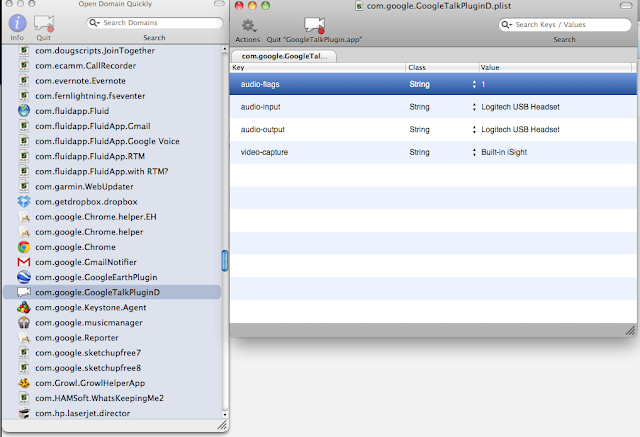
So far I have to reset it for every call. I tried doing it with Chrome all quitted, and then restarting (someone somewhere said I should), but it still resets to 3 pretty often.
For Skype:
I'm gonna try this guy's thingy.
Okay, that doesn't work either, not even a little bit. Bargh.
Now tried this one: seems good so far.
UPDATE 06-06-12
Skype's latest has an option to turn off mic auto-adjusting. Ta da!
So!
For Google Talk (still don't know how that's different than Google Voice) downloaded PrefSetter.app, and changed "audio-flags" to 1.

So far I have to reset it for every call. I tried doing it with Chrome all quitted, and then restarting (someone somewhere said I should), but it still resets to 3 pretty often.
For Skype:
I'm gonna try this guy's thingy.
Okay, that doesn't work either, not even a little bit. Bargh.
Now tried this one: seems good so far.
UPDATE 06-06-12
Skype's latest has an option to turn off mic auto-adjusting. Ta da!
Tuesday, February 7, 2012
Atlas Ti Co-Occurence Tools
Thursday, January 26, 2012
Recording Gchat Calls with Headset
Used these sources:
Pretty
Also Pretty
Ugly
Here's what to do:
Download Line-In and Soundflower.
Go to System Preferences -> Sound -> Output Device and pick the headphones/mic thing.
Set Line-In to run what it gets from the microphone to Soundflower:

"Pass Thru" apparently is like an on-off switch. It's meant to be temporary.
Go to Gmail settings - Chat and set Soundflower as the output device and your microphone as the input device. [NO! Set the headset thingy to both input and output!]
Set Soundflower to use the microphone as the 2-channel device.

Go to Audacity -> Preferences -> Devices and set Soundflower (2ch) for the recording device.
I think you can duplicate/totally-mess-up some of this by doing it in the System Preferences. I don't think I'm going to mess with that for now.
Can't remember how to turn off the doubly echo thing. Annoying. I know I fixed it once already...


Pretty
Also Pretty
Ugly
Here's what to do:
Download Line-In and Soundflower.
Go to System Preferences -> Sound -> Output Device and pick the headphones/mic thing.
Set Line-In to run what it gets from the microphone to Soundflower:

"Pass Thru" apparently is like an on-off switch. It's meant to be temporary.
Go to Gmail settings - Chat and set Soundflower as the output device and your microphone as the input device. [NO! Set the headset thingy to both input and output!]
Set Soundflower to use the microphone as the 2-channel device.
Go to Audacity -> Preferences -> Devices and set Soundflower (2ch) for the recording device.
I think you can duplicate/totally-mess-up some of this by doing it in the System Preferences. I don't think I'm going to mess with that for now.
Can't remember how to turn off the doubly echo thing. Annoying. I know I fixed it once already...
- Things I've tried:
- muting various things in the midi settings through soundflower
- switching around the line-in settings
- messing with volumes in audacity and system settings
- switching things in system settings (make less difference than you'd think)
Okay, got it.
To Get Rid of Annoying Micro-Delay Echo Torture: I need to stop Soundflower from playing the audio through the headset, so that means I also need to have Gchat go straight to the headphones in stead of going through Soundflower (see black and orange note above).
So that looks like this in the Soundflower menu:

Also need to make sure Soundflower volume is up in the System Sound settings, because I'm pretty sure this affects how loud it is in the Audacity recording, compared to my mic'd voice. Watch the waveform as it records to make sure:

Also make sure that I click on "Logitech USB Headset" after adjusting Soundflower volume, or I won't be able to hear anything.
This is probably a really dumb way to do this...
UPDATE:
And it WAS a really dumb way to do it. Never got it to work consistently. Just bought Audio Hijack Pro. Other than auto-adjusting mic (another post), everything works fine.
UPDATE:
And it WAS a really dumb way to do it. Never got it to work consistently. Just bought Audio Hijack Pro. Other than auto-adjusting mic (another post), everything works fine.
Saturday, December 31, 2011
Word
Mac word 2010 is freezing a lot, and it only does it if I haven't saved for a while. Lost some good stuff dammit.
Turning off autorecovery saves to see if that helps. I think that caused problems in previous versions. It makes me nervous, but the only time I use the autorecovery saves is when Word crashes, so if this stops Word from crashing, it will be so fuxed.
01-08-12
Word crashed. No recovery info. Turning auto-save back on. Dammit.
02-27-12
So much crashing, even on newish documents. No help on forums, they say it's all about network drives and such, but I'm just saving directly to the harddrive. I wonder if it has something to do with the way Dropbox and Synk keep tabs on files...might email support to ask about it.
UPDATE - 03-26-12
Turned off "smart copy and paste." This makes me happy because "smart" apparently means "spastic/drastic/irreversible formatting seizure," but it also might help with the crashing.
Turning off autorecovery saves to see if that helps. I think that caused problems in previous versions. It makes me nervous, but the only time I use the autorecovery saves is when Word crashes, so if this stops Word from crashing, it will be so fuxed.
01-08-12
Word crashed. No recovery info. Turning auto-save back on. Dammit.
02-27-12
So much crashing, even on newish documents. No help on forums, they say it's all about network drives and such, but I'm just saving directly to the harddrive. I wonder if it has something to do with the way Dropbox and Synk keep tabs on files...might email support to ask about it.
UPDATE - 03-26-12
Turned off "smart copy and paste." This makes me happy because "smart" apparently means "spastic/drastic/irreversible formatting seizure," but it also might help with the crashing.
Subscribe to:
Posts (Atom)